Pinout
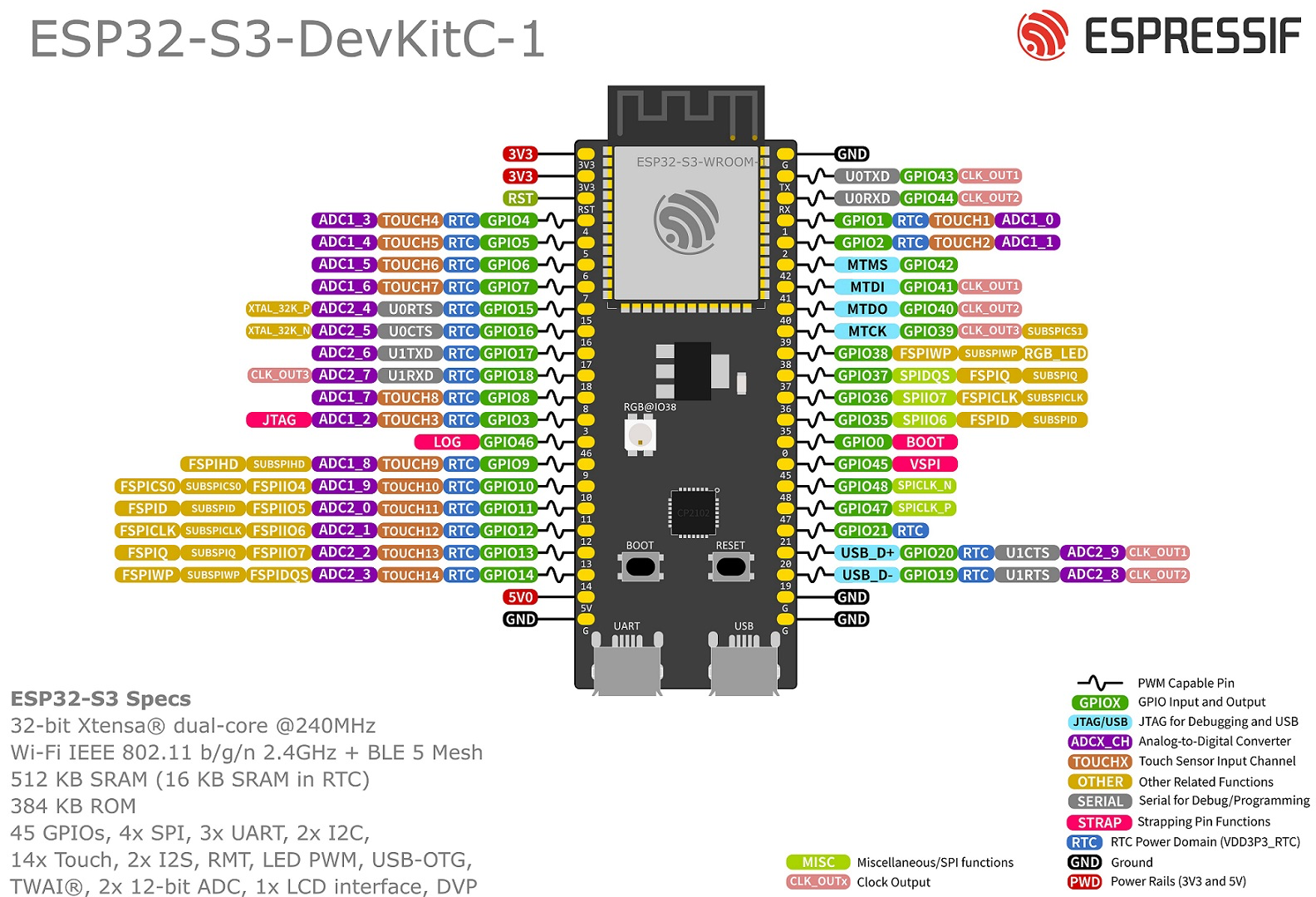
The ESP32-S3 is a powerful esp32 SOC
ESP-IDF
Let me explain how to flash the ESP32-S3 via USB-C port on your ESP32-S3-WROOM-1 DevKit:
- Normal Mode Flashing:
Copy
- Connect the board to your computer via USB-C cable - No need to hold any buttons initially - The board should be automatically detected
- If Normal Mode doesn’t work, use Download Mode:
Copy
- Hold down the BOOT button (GPIO0) - While holding BOOT, press and release the RESET button - Release the BOOT button - The board should now be in download mode
- For
idf.pycommands:
bash
Copy
# First, find your port idf.py -p PORT flash # On Windows might be COM3, on Linux /dev/ttyACM0 or similar # Example: idf.py -p COM3 flash # Windows idf.py -p /dev/ttyACM0 flash # Linux
Key points:
- The ESP32-S3 has built-in USB-Serial support, so no external USB-UART bridge is needed
- Make sure you have proper USB drivers installed:
- Windows: Usually installs automatically
- Linux: Usually works out of the box
- macOS: Usually works out of the box
- If the port isn’t detected, try:
- Different USB cable (some cables are power-only)
- Different USB port on your computer
- Reinstalling USB drivers