ESP-IDF is a set of tools to develop directly for the esp32 family of microchips
Project Structure
main/- represents the main componentCMakeLists.txt- registers main componentCMakeFile- which compiles entire proejctsdkconfig-
Workflow
Configure
idf.py create-project NAME
idf.py set-target esp32
idf.py menuconfig
Build
This stage generates 3 binary files:
- partition table
idf.py allFlash
idf.py flashMonitor
idf.py -p $PORT monitorDebug:
Runtime:
- GDB
- OpenOCD
- GDB Stub
Post-mortem
- Core Dump
- GDB Stub (Panic)
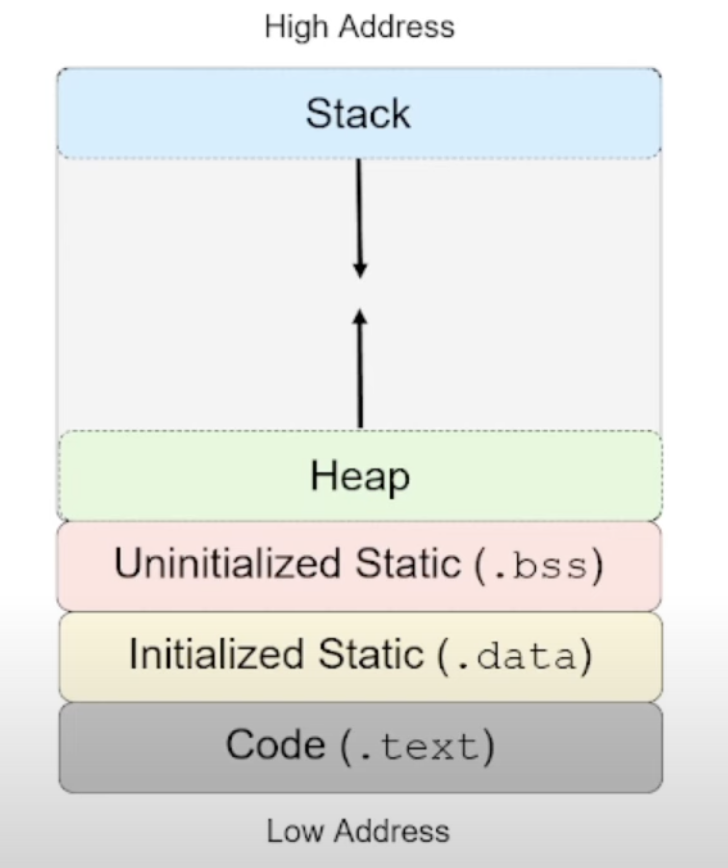
memory structure.excalidraw
⚠ Switch to EXCALIDRAW VIEW in the MORE OPTIONS menu of this document. ⚠ You can decompress Drawing data with the command palette: ‘Decompress current Excalidraw file’. For more info check in plugin settings under ‘Saving’
Excalidraw Data
Text Elements
High Address
Heap
Uninitialized Static (.bss)
Initialized Static (.data)
Code (.text)
Stack
Low Address
Link to original
Components
Libraries with extra features:
- source files, headers and
includedirectories - linker fragments (
linker.lf) - specify memory placement of data and functions of the components - Embedded Binary and text files -
- other pre-compiled libraries -
- KConfig -
- Unit Tests (
tests/) -
# Register a component

idf_component_register (
	# Source files for this component
	SRCS ./src/my_component.c ./src/algo.c
	#include directories for this component
	INCLUDE_DIRS ./include
	#Other components required by this component
	REQUIRES esp_lcd
	PRIV_REQUIRE driver
	#Linker fragment for this component
	LDFRAGMENTS linker.lf
)
cmake_minimum_required(VERSION 3.16)
# Pull in IDF Cmake Wrappers
include($ENV{IDF_PATH}/tools/cmake/project.cmake)
#Default directories that are searched for components
# - "esp-idf/components/"
# - "my_project/components/"
# - Declare any extra directories to search for components
set (EXTRA_COMPONENT_DIRS "$ENV(MY_LIBS)/components")
# Declare project
project (my_project)Relevant Links